
Welcome to this Strikingly and Squarespace comparison where these two popular website builders will be fighting to the death…
 Bit much? Yeah, you’re probably right!
On a lighter note, either platform is a great choice for a professional looking, modern website but I believe it depends on what type of site you intend to create as to which one you should choose.
As they say, “The devil is in the detail” so let’s go take a look!
1. Design Templates -Quantity vs Quality
Strikingly has recently added over a hundred new templates which is a far cry from the 28 I had to choose from when I first reviewed them.

This is huge for Strikingly as I didn’t find them to be all that customizable previously and so with a wider selection, you now have more of a chance of finding something that’ll suit you straight out of the box.
Strikingly’s templates, first and foremost, are “one-page” designs which means that all of your website will be displayed on a single page and the user will simply scroll down to see your “about us” section and contact details etc.
These single pagers are ideal for lighter websites where you only require a few pages and images and they make browsing your website on a mobile device a breeze.
It is possible to add multiple pages to your website but you can only do so on the middle plan or higher (more on pricing a little later).
Squarespace, on the other hand, has fewer designs but they’re often referred to as the best amongst their peers and I have to agree.
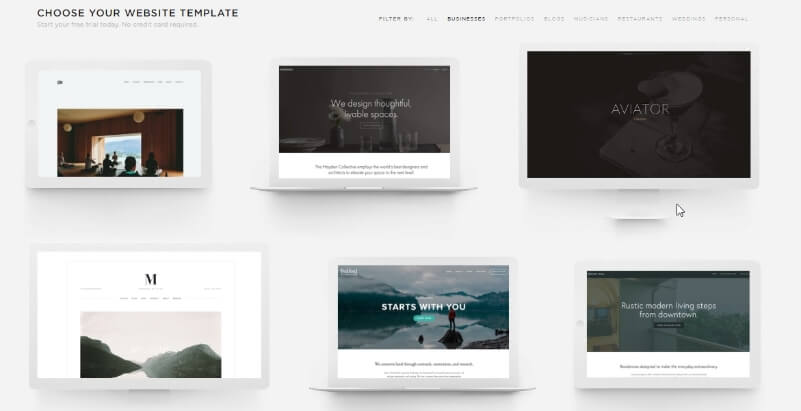
Unlike Strikingly, Squarespace’s designs are based on what I like to think of as regular, multi-page website but it’s also possible to create a single page site too if you wish.
Not only do the templates look great, they’re also very customizable. You really are in the driving seat when it comes to the look and feel of your site.
The only downside is that you aren’t allowed to use the sample images.
Instead, you’ll have to provide your own or you have the option of purchasing them from inside your Squarespace account.
Regardless of which you choose, rest assured your site will automatically shrink down to look great and function correctly on smartphones and tablets without any additional effort on your part.
2. Ease of Use
If your main goal is to get a website up and running as quickly as possible with the shortest learning curve, Strikingly takes home the gold in this area.

After 15 or 20 minutes, the tools and options become fairly self-explanatory and if you do get stuck at any point, the support team are always there to lend a hand.
Part of the reason it’s so easy is due to the fact there aren’t a ton of customization options and you create your site by adding a selection of pre-made “sections” on top of each other. You can then edit the text, images and basic colors within each section.
Squarespace gives you plenty of freedom when it comes to customizing your website but it comes at a cost….
…a rather steep learning curve.

There isn’t really a way around it other than to explore all of the tools at your disposal and watch the videos and training tutorials until you feel confident enough to really get stuck in.
Like Strikingly, Squarespace also provide fast, reliable, support should you run into problems.
3. Features Face-Off!
Strikingly and Squarespace offer all of the essential features you’d expect such as contact forms, social media integration, image galleries, and visitor stats etc.
Although both platforms also have blogging and e-commerce capabilities (allowing you to sell your own products), I believe it’s these features that set them apart.
Allow me to explain…
With Strikingly’s focus on simpler websites, it’s more than capable of handling the odd blog post.
But if blogging’s your main goal, Squarespace is the stronger option. In fact, in fact, I believe that Squarespace is second only to WordPress in the blogging stakes.
And the same goes with eCommerce.
Strikingly provides you with a quick and easy way for you to begin selling a few products, but if you plan to expand down the line, you could save yourself a ton of headaches down the road by choosing Squarespace right off the bat.
I should also point out that neither platform provides a native newsletter platform or appointment scheduling but you are able to integrate popular third-party applications such as MailChimp and Setamore to accomplish this.
If you’re looking for a website builder that has all of these features built in, take a look at Wix).
4. Customer Support - It’s a Tie
Strikingly’s “happiness officers” are available via live chat or email and are always ready to lend a hand.
I have to say, dealing with them was an absolute pleasure!
You’ll also find phone support but only as part of the VIP plan which we’ll be taking a look at in the next section.
Similarly, Squarespace offers support through live chat and email. They also have a community forum where you can go to ask questions or browse previous answers.
5. Pricing - Which One Best Suits Your Budget?
Strikingly offers a choice of 3 premium plans all of which come with a 14-day free trial.
*Note: Prices shown are for an annual plan billed upfront. Monthly plans are also available but cost a little more.
The first is $8/month and with this plan, you’ll get a free domain name if you pay for the year upfront and you can sell up to 5 products.
The second option is $16/month and lets you sell up to 300 products, create multiples page and lets you integrate third-party applications such as booking forms which we touched upon earlier.
Finally, the VIP plan will set you back $49/month and allows you to sell up to 500 products and offers phone support.
Squarespace offers the Personal plan at $12/month which would best suit a fairly basic or hobby site. You’ll be able to create up to 12 pages on this plan.
Should you require more pages, you’ll need to opt for the $18/month Business plan.
*Note: Prices shown are for an annual plan billed upfront. Monthly plans are also available but cost a little more.
While these plans offer full eCommerce functionality, you will have to pay a commission of 3% or 2% respectively on each sale depending on which plan you choose.
If you intend to start a store right out of the gate, Squarespace has two dedicated eCommerce plans bursting with extra features and no transaction fees which may suit you better.
The eCommerce plans are priced at $26/month and $40/month.
6. Conclusion - It’s Decision Time!
I sincerely hope after reading this comparison you have a clearer idea of which platform best suits your needs.
Just to recap;
Strikingly’sa solid contender for a super stylish, mobile-friendly website. It’s easy to use and the “plug and play” websites will allow you to get up and running in the shortest time possible.
Click here to start your Strikingly 14-day free trial.
If it’s a larger project that you have in mind, such as a full-blown blog, photography site or eCommerce store, then Squarespace is the stronger option.
It comes with a slightly steeper learning curve but you’ll ultimately have more control over the look and feel of your website.
Click here to start your Squarespace 14-day free trial.
Dig Deeper;
